Workflow: Attendance Recovery (AR)
Print
Modified on: Thu, May 14, 2026 at 12:02 PM
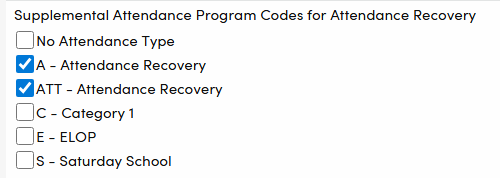
- Update Code Table: Check that there is at least one AR-Specific Code created for the each of following tables/fields for use in your district:
- Supplemental Attendance Type Codes (ATP.TY) Need at least one separate code to use only for AR. (Note this must be different than the code(s) your district will use for ELOP and Saturday School).
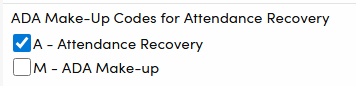
- ADA Make-Up Code (ATT.ADA) Need at least one separate code to use only for AR.
- District Setup Tasks in District Settings: Define which local AR codes have been set up that are used for Supplemental Attendance Sessions and ADA Make-Up. See District Settings.
- Identify in DPT table which local Supplemental Attendance Type Codes is to be used only for AR.
- NEW! Identify in DPT table which local code will be used in ADA Make-Up Code (ATT.ADA) field ONLY for AR. See How will AR Be Used in Aeries.
- Recording AR Sessions completed by students
- Option 1 – Using Supplemental Attendance feature to record all AR functions for earning hours. See How will AR Be Used in Aeries.
- Attendance Sessions must have AR code(s) defined in District Settings.
- Attendance Hours will be calculated from the ATD records and stored in ATD.ARH for all AR records.
- AR records are used to populate Attendance Recovery Bank (ARB) table.
- Option 2 – Using 3rd Party data and import directly into ATD student sessions table
- Attendance Sessions must have AR code defined in District Settings.
- Sessions must exist and be linked to a proper AR Attendance Type Code. See Importing Supplemental Attendance Data.
- Imported Data will be used to calculate the Attendance Recovery Bank (ARB)
- Option 3 – Using 3rd party system to fully track AR, bypassing ATD completely (no audit path in Aeries)
- No District Setting needed
- No AR records in Supplemental Attendance
- No ARB functionality
- Recovering Absences: Absences can be recovered using ADA Make-Up code(s) defined as AR. See ADA Make-up.
- Option A - Using ADA Make-Up Code in conjunction with ARB table showing summarized data from ATD.
- ADA Make-Up Code must be defined as AR in Districts Settings in order for the Monthly Summary Report to accurately reflect it. (Coming Soon)
- ARB tables can be calculated using new Mass Calculate AR for all Students button. ARB fields are read-only. It is not possible to import data into it.
- Students who are eligible for AR recovery can be identified from the ARB Page
- Manual entry of the AR ADA make-up code in Attendance screen.
- Option B: Using ADA Make-Up Code without involving ARB table
- ADA Make-Up Code must be defined as AR in Districts Settings in order for the Monthly Summary Report to accurately reflect it.
- Identify eligible students using other means
- Manual entry of the AR ADA make-up code in Attendance screen.
- State Reporting
- Using the ADA Make-Up code will automatically adjust the Apportionment Days on the Monthly Attendance Summary reports. See ADA Make-Up.
- Query can also be used to identify ADA Make-Up records. See ADA Make-Up.
- CALPADS - STAS Extract will similarly use total Absences recovered via AR by student & school (where absence occurred) Data is extracted from ATT.ADA where the code is defined as an AR ADA
Resources ↑
Did you find it helpful?
Yes
No
Send feedback Sorry we couldn't be helpful. Help us improve this article with your feedback.

