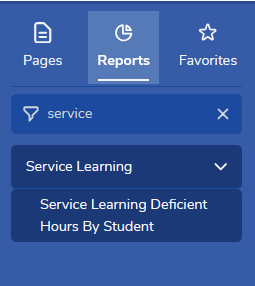
The Service Learning Deficient Hours By Student report is available in both district and school Aeries for secondary schools, to users with Read permission to Service Learning Data and Log (SLL). Open Reports in the left navigation and select Service Learning > Service Learning Deficient Hours By Student, or go to Service Learning > Reports.
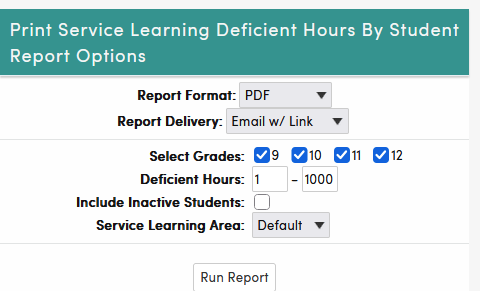
The following report options are available:
- Select Grades – 9th through 12th grade, all checked by default. At least one grade must be selected.
- Deficient Hours – only students whose deficient hours fall within this range are listed (defaults: 1 to 1000).
- Include Inactive Students – inactive students are marked with an asterisk (*) on the report.
- Service Learning Area – the report runs for one Service Learning Area at a time.
Running the report also recalculates and saves the required and completed hours for every student in the selected grades, so it is a good way to bring stored totals up to date before querying them.
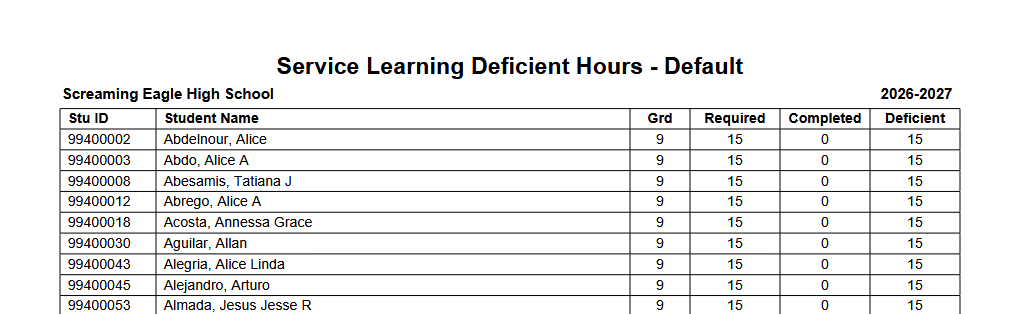
Below is an example of the report. The title includes the Service Learning Area, and students are grouped by school and grade. Required is the student's required hours for the area added up from 9th grade through their current grade, Completed is the total approved hours counted for the area, and Deficient is Required minus Completed.