

Attendance Recovery Overview ↑
We are working on adjustments in Aeries to align with the changes expected for Attendance Recovery. At this time, the following changes have been made that will provide some guidance on the direction we are going with keeping track of Attendance Recovery so that it can be reported during the Principal Apportionment periods and in the STAS extract beginning 2025/26 school year. Programming logic to the STAS extract will come at a later time.
Supplemental Attendance ↑
It is recommended to utilize the Supplemental Attendance table for logging students who will receive Attendance Recovery. Supplemental Attendance documentation can be viewed under Supplemental Attendance.
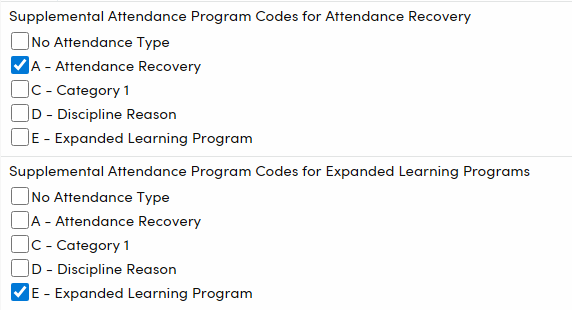
The District Settings page has been updated to include storing the codes necessary to identify Attendance Recovery and ELOP.
- Supplemental Attendance Program Codes for Attendance Recovery- Select codes that identify Attendance Recovery programs. This will be used in conjunction with the AR reporting for CALPADS beginning in 2025/26.
- Supplemental Attendance Program Codes for Expanded Learning Programs- Select codes that identify Expanded Learning programs. This will be used in conjunction with the ELOP reporting for CALPADS beginning in 2025/26.
- Codes displayed in this section are from the Code table under ATP.TY for both AR and ELP Programs.
Supplemental Attendance sessions should be setup so they capture dates that fall within the academic year in which they will be reported.
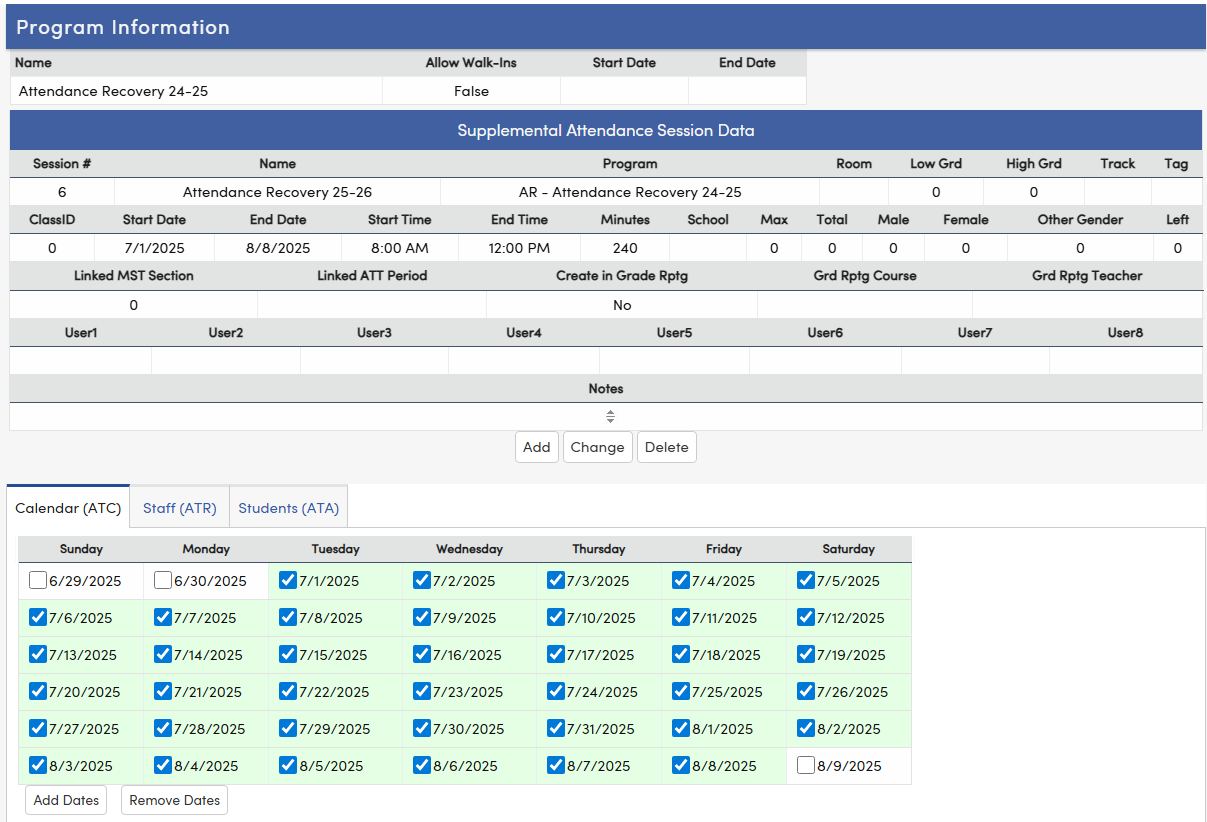
- Sessions should always end on the last day of the academic year (June 30th) and new sessions should begin on July 1st so that AR or ELP data is consisently calculated and reported in the appropriate academic year.
NOTE: A student may generate a day of attendance for apportionment by participating in Attendance Recovery (AR) over multiple days, accruing time in hourly increments (EC Section 46211(e)(1)). Supplemental Attendance session time must be set in hourly increments.
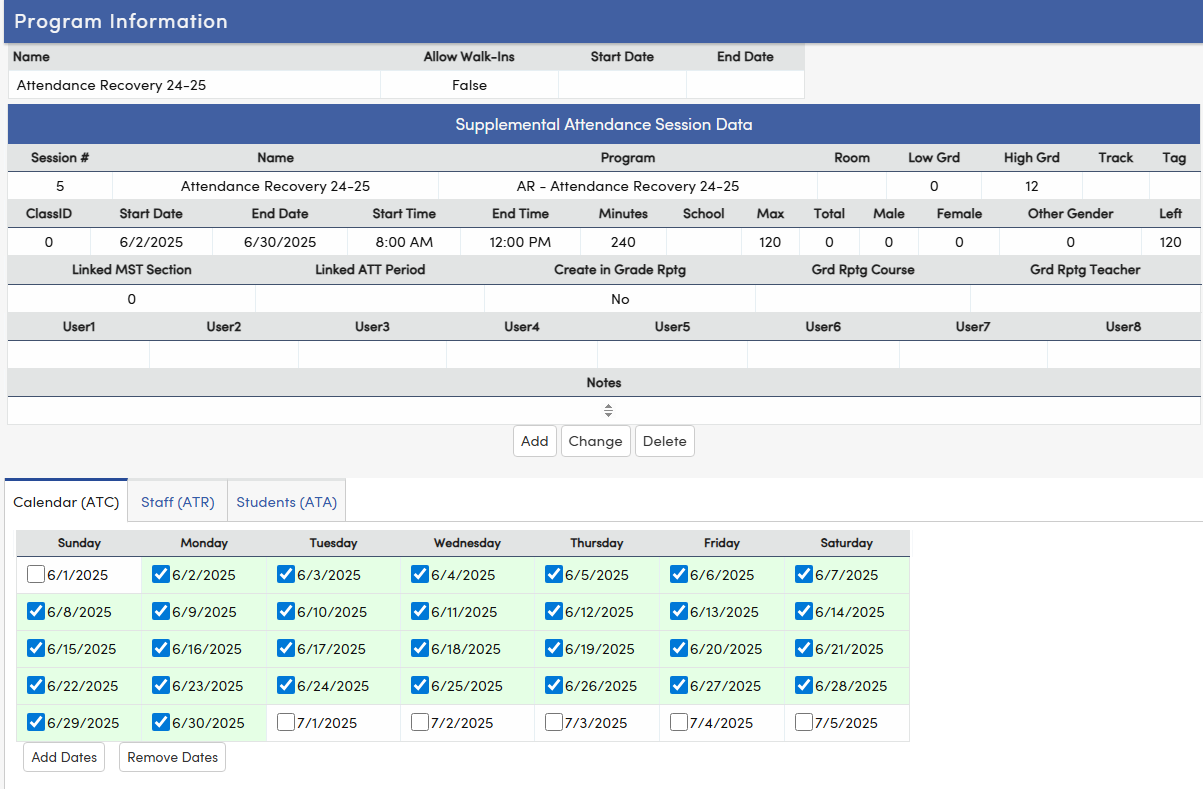
A session that applies to the 2025/26 academic school year should contain only records that start and end within the 2025/26 academic year. The Supplemental Attendance Session Data - Start Date and any Calendar (ATC) dates selected should consist of a start date of July 1 with an end date no later than 06/30/2026.
Based on the Supplemental Attendance data for the codes identified as Attendance Recovery or Expanded Learning Programs, the tables that store data: Attendance Sessions (ATS), Attendance Calendar (ATC), Attendance Assignments (Students) (ATA) and times entered for students (ATD) will be included in the new year rollover. Only records that contain dates that start on or after July 1 of the new school year will be included in the rollover process. This will ensure that all necessary records may be used in reporting AR for the appropriate school year.
Supplemental Attendance uses the following tables:
ATA - Supplemental Attendance Assignments (Students)
ATC - Supplemental Attendance Calendar
ATD - Supplemental Attendance Data – times entered for students
ATP - Supplemental Attendance Programs
ATR - Supplemental Attendance Staff
ATS - Supplemental Attendance Sessions
STF - Staff
Planned Enhancements to Supp Att Data (ATD) table
What’s Changing?
- A new field called AR Hours (ATD.ARH) will be added to track how many Attendance Recovery Hours a student earns during Supplemental Attendance sessions.
How Will It Work?
- The system will look at how many minutes a student attends an Attendance Recovery session.
- It will convert those minutes into hours, rounding down to the nearest whole hour (following CDE rules).
- This field will only be filled in for sessions that are specifically marked for Attendance Recovery.
What About Existing Data?
- All current records will be updated once to include this new AR Hours field.
- In the future, any new records will have this field filled in automatically.
How Can You Use This?
- Until reports are updated to use this new field, you can run queries to see which students have earned enough hours for Attendance Recovery.
ADA Make-up ↑
A student may generate a day of attendance for apportionment by participating in Attendance Recovery (AR) over multiple days, accruing time in hourly increments (EC Section 46211(e)(1)). The ADA Make-up code can be used in negative attendance schools.
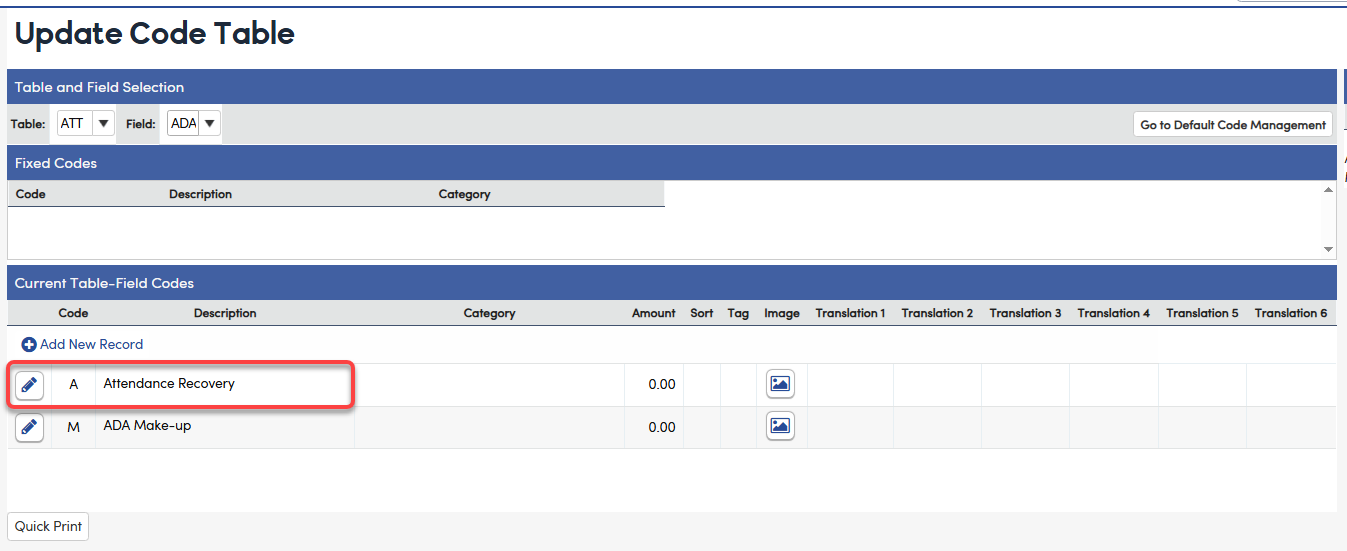
The code table needs to be updated to include a separate code for Attendance Recovery. In the Update Code Table, select the ATT table and the ADA field. Add a code that represents Attendance Recovery.
Navigate to attendance, select the Attendance Note for the date that will be recovered.
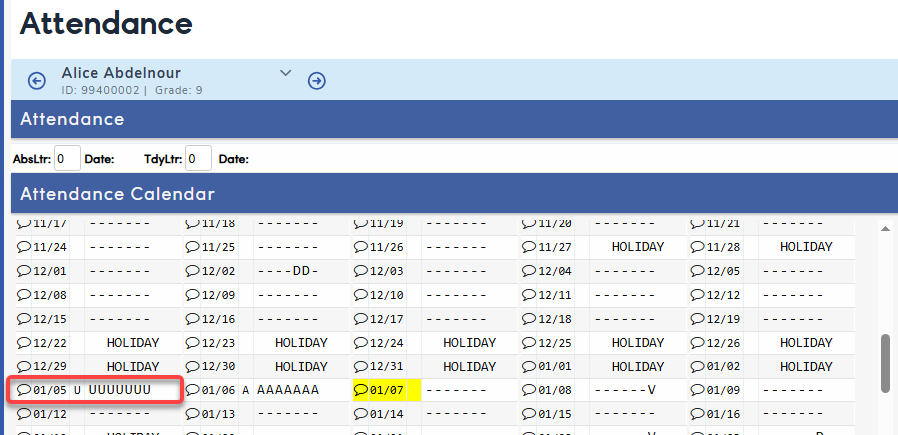
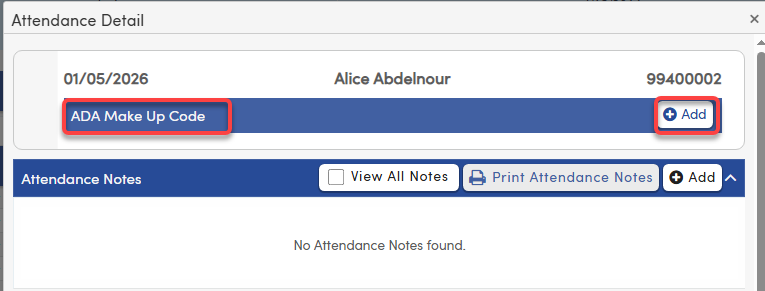
Select Add under ADA Make Up Code.
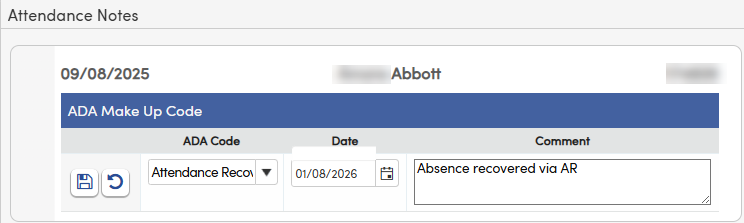
Select the Attendance Recovery Code from the dropdown and the date that the attendance was recovered on. A comment can be added. Save the record.
The following query can be used to identify students who have earned an ADA Make-up Code for Attendance Recovery:
LIST STU ATT STU.ID STU.NM STU.GR ATT.AL ATT.ADA ATT.ADT ATT.ACO IF ATT.ADA = "A"
For more information, see ADA Make-up.
NOTE: A student's original absence code is still retained in the Attendance table. The ADA make-up code only affects the apportionment number for the Monthly Attendance Reports/Summary which is used for P1 and P2 reporting.
Monthly Attendance Summary ↑
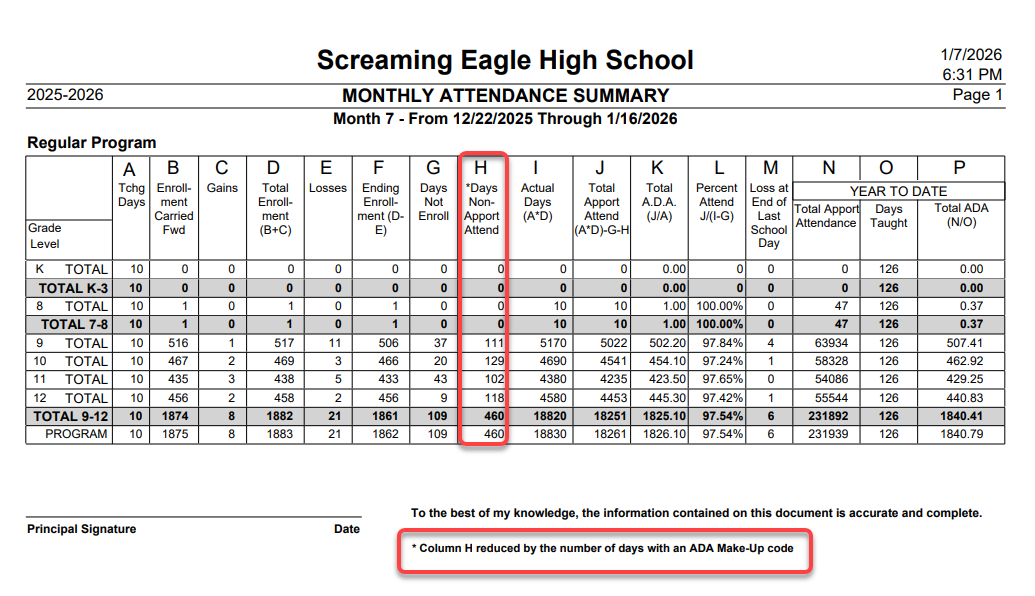
The Monthly Attendance Summary report will reduce the Days Non-Apportioned Attendance (column) by the number of ADA Make-up days. This will include any make-up codes, not just the AR days. The query above can be used to identify the records specific to AR.
Supplemental Attendance Reports ↑
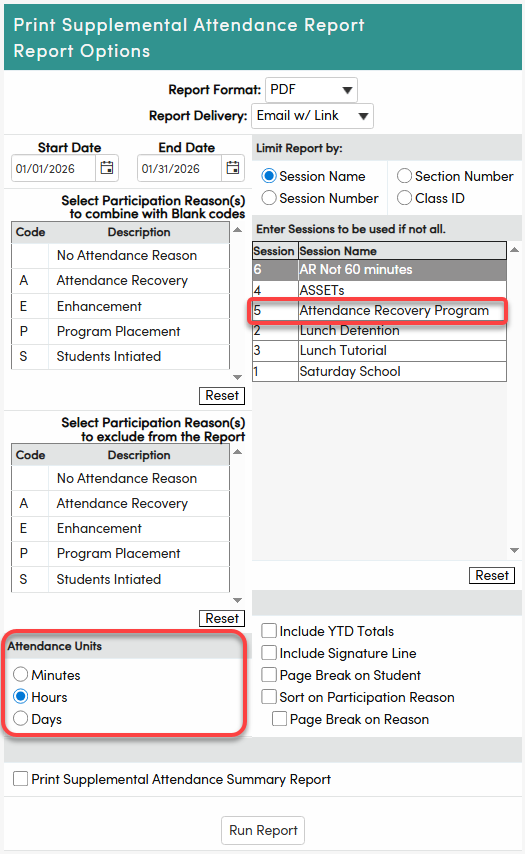
Supplemental Reports can be helpful to show how many minutes or days a student participated in an AR program currently. However, if the AR session is less than a full 60-minute block, the report will not calculate the hours accurately and will require manual review. We plan to make later adjustments to Supplemental Attendance Reports to more fully cover Attendance Recovery, but here are ways to possibly use them now, as long as you understand and follow the CDE rules on the Attendance Recovery.
The Supplemental Attendance Report will display the following information to help identfy students who have completed an hour of Attendance Recovery for a designated date range. The report can be generated in units of Minutes, Hours or Days.
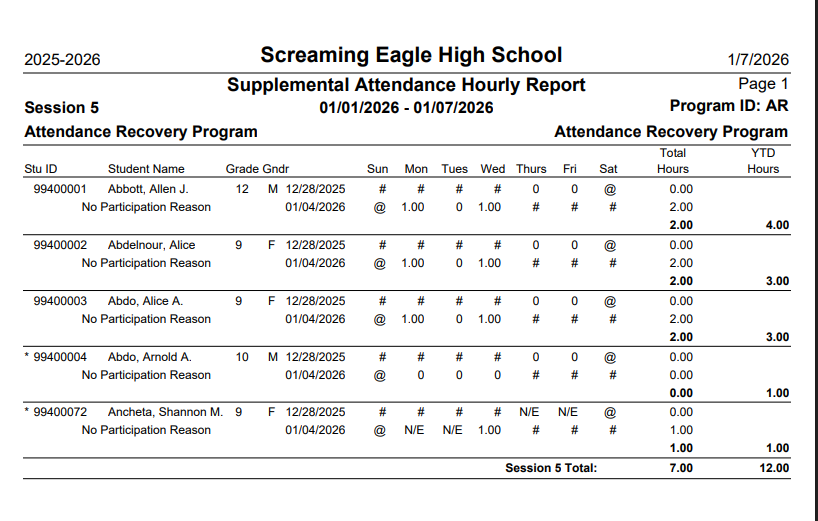
For example, the Supplemental Attendance Hourly Report shows Allen Abbott has completed 1 hour on Monday and 1 hour on Wednesday. These hours can be applied to the student's ADA Make-up or used to report the number of days to the P1 and P2 apportionment reports. We are continuing to build out a more robust feature for calculating AR. See ADA Make-Up section for more information.
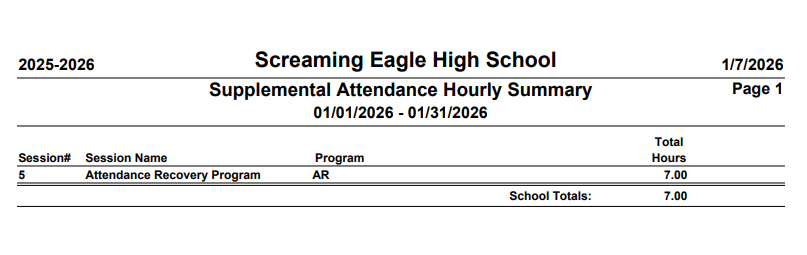
Selecting the Summary option will provide a summary of the hours or minutes for the date range selected.
Resources
For a complete list of FAQ related to Attendance Recovery, see the CDE Attendance Recovery FAQ page.